Retirement planning app for iPhone, iPad and Mac
Short answer
A retirement planning app for iPhone, iPad and Mac should model your country’s pension and tax rules, show how much you can spend each month, test the plan against bad markets, and tell you plainly where your data goes. WisePlan Wealth is one option: it runs on iPhone, iPad and Mac, plans for Canada or the US, and keeps your plan on the device.
- What it is
- An app on your Apple devices that projects income, taxes, spending and savings through retirement.
- Who it helps
- People who would rather plan on their phone or Mac than in a spreadsheet or a web account.
- When to use it, and the catch
- Before choosing a retirement date or benefit start ages. The catch: any app is only as good as your inputs, so update it when your balances or plans change.
Example: On a Mac you can enter your accounts on a large screen, then check the same plan on your iPhone, where the Master Optimizer can set spending and benefit timing in one tap.
WisePlan Wealth is a retirement planning app from WisePlan Wealth Ltd. for iPhone, iPad and Mac (and Android). It plans for Canada or the United States and keeps your plan on your device with no account.
What to look for in an iPhone retirement app
- Your country’s rules. Canada: CPP or QPP from 60 to 70, OAS from 65 to 70 and its recovery tax, GIS, RRSP to RRIF, TFSA. US: Social Security from 62 to 70, 401(k), IRA, Roth and RMDs.Guides: retirement planning app for Canada, retirement planning app for the US.
- After-tax monthly spending. The answer you live on is what you can spend each month after tax, not a portfolio balance.Guide: how much can I spend in retirement?
- Market stress tests. A good app shows how the plan copes with poor returns early in retirement.Guide: Monte Carlo retirement apps.
- Privacy. Check the App Store privacy label and whether you need an account or linked bank logins.Guide: retirement planner with no account.
- Price. Check what the free version does and what the subscription costs before entering your whole plan.Guide: free retirement planning apps.
Monthly spending calculator
How this estimate works
- A level monthly amount that runs the savings down to $0 at the plan-to age, with the return you enter (after inflation).
- Income tax, fees and market ups and downs are not included. A real plan should be tested against bad markets.
- The 4% rule figure is 4% of the savings in year one, divided by 12, shown for comparison.
Runs in your browser. Nothing is saved or sent.
Get a full plan with taxes, benefits and market stress testsAn estimate for education, not financial, tax or investment advice. Today’s dollars, before income tax.
WisePlan Wealth on Apple devices
- Compatibility (App Store): iPhone with iOS 26.0 or later, iPad with iPadOS 26.0 or later, Mac with macOS 26.0 or later, and Apple Vision with visionOS 26.0 or later.
- Privacy: no account, no ads; the App Store privacy label reads “Data Not Collected”.
- Master Optimizer (iPhone and iPad, not Android): one tap sets spending, benefit timing and withdrawal strategy for the most after-tax income at a target Market Resilience level.
- Projection: income, spending, taxes, pensions and investment growth year by year, with Go-Go, Slo-Go and No-Go spending phases shown per month after tax.
- Market Resilience: your plan is tested against 7-year blocks of real historical returns and inflation, over the life expectancy you enter.
- New in 1.8: a Savings Before Retirement planner with employer match, couple tax planning with survivor years, refined Retirement %, PV Funded and Market Resilience scores, a Minimum Legacy check, and faster optimizers.
- Pro: profile import, export and sharing by AirDrop or email, and unlimited profiles.
Prices on the App Store
Free to download with a Standard tier. Prices from 12 October 2026:
- Canada: Premium $6.99 a month or $39.99 a year; Pro $299 a year.
- United States: Premium $4.99 a month or $29.99 a year; Pro $249 a year.
Prefer Android? See the retirement planning app for Android page. Comparing with web planners? See retirement planning software and retirement planning apps compared.
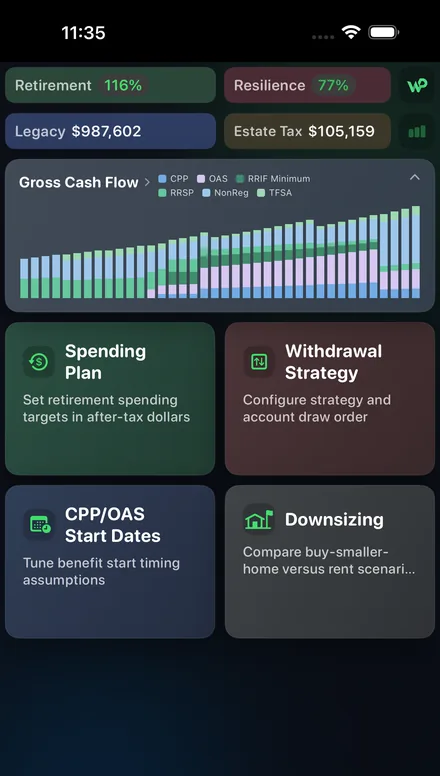
Will your net worth last?
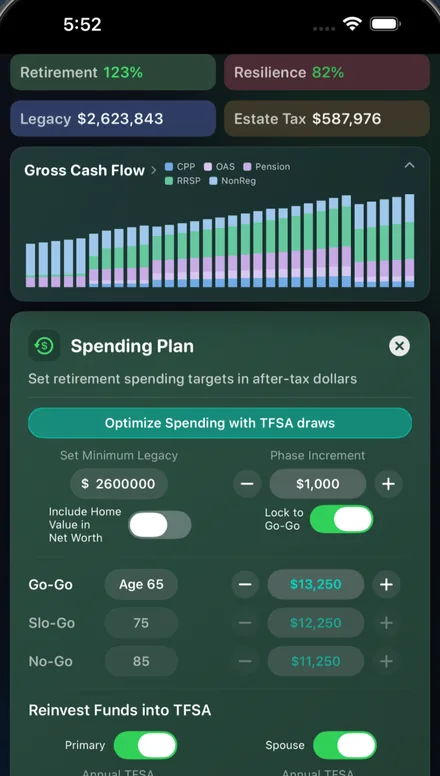
How much you can spend monthly
Terms in plain language
- Privacy label
- What it is: the App Store’s summary of what data an app collects, written by the developer. Who it helps: anyone entering personal finances into an app. When to use it: before you download. The catch: it is the developer’s own statement, so also read the privacy policy. Example: WisePlan Wealth’s label reads “Data Not Collected”.
- Market Resilience
- What it is: the share of market scenarios, built from real history, in which your plan pays its spending to the life expectancy you enter and leaves at least your Minimum Legacy. Who it helps: anyone worried about a market crash. When to use it: after setting spending, to see how much room you have. The catch: it is based on past markets, which won’t repeat the same way. Example: a score of 80% means the plan worked in 80 of every 100 scenarios.
Frequently asked questions
- What is a good retirement planning app for iPhone?
- Look for one that follows your country’s rules (CPP, OAS and RRSP/TFSA in Canada; Social Security, 401(k), IRA and RMDs in the US), includes income tax, tests your plan against bad markets, and is clear about where your data is stored and what the paid tier costs.
- Does WisePlan Wealth work on iPad and Mac?
- Yes. The App Store lists iPhone (iOS 26.0 or later), iPad (iPadOS 26.0 or later), Mac (macOS 26.0 or later) and Apple Vision (visionOS 26.0 or later).
- Does the iPhone app need an account?
- No. The plan stays on your device, and the App Store privacy label reads “Data Not Collected”. There are no ads.
- How much does WisePlan Wealth cost on the App Store?
- It is free to download. In Canada, Premium is $6.99 a month or $39.99 a year, and Pro is $299 a year. In the US, Premium is $4.99 a month or $29.99 a year, and Pro is $249 a year. Prices from 12 October 2026.
- What is the Master Optimizer?
- A feature on iPhone and iPad (not on Android) that sets spending, benefit start dates and withdrawal strategy in one tap, aiming for the most after-tax income at a target Market Resilience level.
- Can I share a plan with my spouse or advisor?
- The App Store listing puts profile import, export and sharing (by AirDrop, email or any sharing method) in the Pro tier.
Sources (prices checked 17 November 2026; other listing facts checked 7 October 2026)
Related retirement planning guides
- Free retirement budget calculator: what your pensions, income and savings give you each month, next to your spending.
- Retirement planning apps compared: Boldin, ProjectionLab, Empower, Optiml and more, side by side.
- Retirement planning app for Canada: what an app must model for CPP, OAS, GIS, RRSP and TFSA.
- Retirement planning app for the US: Social Security, 401(k), IRA, Roth and RMDs.
- Retirement planning in Canada: a 7-step guide: spending target, CPP, OAS, savings, withdrawals and risk.
- Retirement income planning in Canada: turning CPP, OAS, pensions and RRIF withdrawals into a monthly income.
- Retirement planning for couples: two sets of benefits, pension splitting and survivor years.
- Retirement planning at 50: catch-up savings, a target and a first projection.
- Retirement planning at 60: benefit start ages, the bridge years and RRSP to RRIF.
- Free retirement planning apps and calculators: what free tools do and where the paid tiers start.
- DIY retirement planning vs a financial advisor: what you can do yourself and when advice is worth paying for.
- Monte Carlo retirement apps: how market stress tests work and how to read a success score.
- Retirement planning app for Android: what to look for in an Android retirement planner.
- Retirement planning software for individuals: web planners, apps and spreadsheets compared.
General information, not financial, tax, investment, legal or accounting advice. Figures were checked on official and company sites on 7 October 2026 and change over time. Page dated 7 October 2026.