Retirement planning app for Canada: what it should model
Short answer
A retirement planning app for Canada has to follow Canadian rules: CPP (or QPP) from 60 to 70, OAS from 65 to 70 and its recovery tax, GIS, the RRSP-to-RRIF deadline at 71, TFSA withdrawals and provincial tax. Several well-known US apps are built on US rules, so check Canada support first.
Options with Canadian support include ProjectionLab (Canadian presets), Optiml and RetireZest (Canadian web planners; see WisePlan vs RetireZest) and WisePlan Wealth (an app for iPhone, iPad, Mac and Android with no account).
- What it is
- An app that projects your income, taxes and savings year by year to show whether your money lasts and how much you can spend each month.
- Who it helps
- Canadians in their 50s and 60s deciding when to retire, when to start CPP and OAS, and which account to draw from first.
- When to use it, and the catch
- Use it before you pick benefit start ages or a withdrawal order. The catch: results are estimates built on your assumptions about returns, inflation and how long you live, so re-run them every year and confirm benefit amounts with Service Canada.
Example: A 60-year-old couple with RRSPs, TFSAs and two CPP records can compare starting CPP at 60 or at 70 and see how their after-tax monthly spending and their estate change.
WisePlan Wealth is a retirement planning app from WisePlan Wealth Ltd. It runs on iPhone, iPad, Mac and Android, plans for Canada or the United States, and keeps your plan on the device with no account.
CPP and OAS start-age calculator
How this estimate works
- CPP changes 0.6% for each month before 65 and 0.7% for each month after, to 70 (Canada.ca).
- OAS rises 0.6% for each month you wait after 65, to 70 (Canada.ca). The 10% OAS increase at 75 and the OAS recovery tax are not included.
- Default CPP is the average new pension at 65 ($858.34, July 2026); default OAS is the full amount for October to December 2026 ($762.50). Replace both with your own estimates.
- Amounts are monthly, before tax, in today’s dollars. Both benefits are indexed to inflation.
Runs in your browser. Nothing is saved or sent.
See CPP, OAS, taxes and savings together in your planAn estimate for education, not financial, tax or investment advice. Today’s dollars, before income tax. Your own CPP estimate is in My Service Canada Account.
The Canadian rules a planning app must handle
Figures below were checked on Canada.ca on 7 October 2026.
- CPP start age: 60 to 70. Payments drop 0.6% a month before 65 (up to 36% at 60) and rise 0.7% a month after 65 (up to 42% at 70). The maximum at 65 was $1,507.65 a month in January 2026; the average new pension at 65 was $858.34 (July 2026).Why it matters: the start age changes your income for life and how much your savings must cover early on. Source: Canada.ca, Canada.ca.
- OAS start age: 65 to 70. Each month you wait adds 0.6%, up to 36% at 70. The maximum for October to December 2026 is $762.50 a month at 65 to 74 and $838.75 at 75 and over.Why it matters: waiting raises OAS for life, but you can’t get GIS until OAS starts. Source: Canada.ca, Canada.ca.
- OAS recovery tax. If your net income is above the threshold ($95,323 for the 2026 income year), you repay 15% of the excess.Why it matters: large RRIF withdrawals or capital gains can push income over the line. Source: Canada.ca. Guide: OAS recovery tax.
- GIS for lower incomes. Up to $1,138.90 a month for a single senior (October to December 2026), and it is not taxable.Why it matters: taxable withdrawals can reduce it the following July. Source: Canada.ca. Guide: GIS.
- RRSP to RRIF at 71. December 31 of the year you turn 71 is the last day to contribute to your RRSPs; after that, the money usually moves to a RRIF with minimum yearly withdrawals.Why it matters: minimum withdrawals are taxable whether you need the cash or not. Source: CRA. Guide: RRSP to RRIF.
- TFSA and RRSP room. The 2026 limits are $7,000 for a TFSA and $33,810 for an RRSP (your own room also depends on your income).Why it matters: which account you save in, and draw from, changes your lifetime tax. Source: CRA. Guide: TFSA vs RRSP.
- Provincial tax. Each province and territory has its own brackets and credits, so the same withdrawal can be taxed differently in Alberta and Ontario.Guide: federal and provincial tax brackets.
How popular apps handle Canada
What each company says on its own site, checked 7 October 2026. This is not a ranking.
Boldin
- Canada support
- Its help centre says the planner is based on US tax law and lacks features for other countries’ retirement and tax rules; it suggests workarounds.
- Cost
- PlannerPlus is listed at $144 a year.
- Source
- Boldin Help Center: Is PlannerPlus suitable for Canadians? (updated 29 May 2026); Boldin pricing
ProjectionLab
- Canada support
- Default Canadian account types like TFSAs and RRSPs, and Canadian tax presets. Canadian tax estimation is a Premium feature.
- Cost
- Basic projections are free; Premium is paid.
- Source
- ProjectionLab for Canadians
Optiml
- Canada support
- Describes itself as retirement planning software for Canadians, with every province and territory.
- Cost and data
- Plans listed at $9.99, $24.99 and $49.99 a month, each with a 14-day free trial. It says data is stored in Canada.
- Source
- Optiml home page and FAQ
RetireZest
- Canada support
- Built for Canadians, with all 13 provinces and territories, including Quebec and the QPP.
- Cost and data
- A free plan with a monthly simulation cap; Premium is paid. You register an account, data is hosted in Canada, and it doesn’t connect to your bank.
- Source
- RetireZest home page and FAQ
Empower
- Canada support
- The Personal Dashboard only links US-based financial institutions (in US dollars). Other accounts can be added by hand.
- Sign-up
- Needs a valid US phone number.
- Source
- Empower support: Can I link an international account?
Rocket Money
- Canada support
- Only available to users located in the United States with US-based banks. It is a budgeting and subscription app rather than a retirement projector.
- Source
- Rocket Money Help Center: international banks
WisePlan Wealth
- Canada support
- Canada and the US in one app: CPP or QPP, OAS and GIS, with RRSP, TFSA and non-registered accounts.
- Cost and data
- Free to download; Premium and Pro in-app. No account, and plan data stays on your device.
- Source
- App Store listing for WisePlan Wealth (Canada)
Comparing US apps in detail? See Boldin, ProjectionLab, Empower and Rocket Money, or every option on the retirement planning apps hub.
What WisePlan Wealth does today
WisePlan Wealth 1.8 includes:
- A year-by-year projection of income, spending, taxes, pensions and investment growth.
- CPP or QPP, OAS and GIS, with RRSP, TFSA and non-registered accounts.
- Go-Go, Slo-Go and No-Go spending phases, with after-tax spending shown per month.
- Market Resilience: your plan is stress-tested against real historical market returns, not one average return.
- Dashboard scores: Retirement Coverage, Market Resilience, Retirement Years, PV Funded, Legacy and Lifetime Tax.
- Premium: an optimizer for CPP/QPP and OAS start ages, workplace pensions and extra income streams, individual holdings, PDF and CSV reports, and more than one profile.
- No account. Plan data stays on the device, and the App Store privacy label reads “Data Not Collected”. No ads.
- iPhone, iPad and Mac (iOS and macOS 26 or later) and Android. Free to download; Premium and Pro are in-app purchases.
New in version 1.8
- Savings Before Retirement: enter your income and yearly RRSP, TFSA and non-registered deposits until you retire, including an employer match (in Canada, a DPSP or Group RRSP) and self-employed income. Your plan then starts from those projected balances.
- Couple tax planning: taxes are calculated for each spouse separately, including the years after one spouse dies.
- Market Resilience on real history: 7-year blocks of actual past returns and inflation, run over the life expectancy you enter.
- Clearer scores: Retirement %, PV Funded and Market Resilience follow the same after-tax funding rules, and Retirement % can show above 100%.
- CPP/OAS start-date advice based on the life expectancy you enter, plus a Minimum Legacy check and a Success Probability chart.
- Master Optimizer (iPhone and iPad only, not Android): one tap sets spending, benefit timing and withdrawal strategy.
How to choose
- Check Canada first. Ask whether it handles CPP or QPP, OAS and its recovery tax, GIS, RRIF minimums and your province’s tax, not just “international” settings.
- Decide where the plan lives. A web account is easy to open anywhere. An on-device app avoids creating an account and uploading your numbers.
- Look at the answer it gives. You want a monthly after-tax spending figure and a clear “does the money last” result, not only a chart of balances.
- Test bad luck. Look for stress tests based on real market history and a plan that runs to an age you might actually reach. See how Monte Carlo retirement apps work.
- Try the free tier. Most of these tools let you start free. Enter the same plan in two of them and compare. See what free retirement planning apps include, or pick by device: iPhone, iPad and Mac or Android.
Try WisePlan Wealth
See whether your net worth lasts through retirement and how much you can spend each month, on your own device. More about the app.
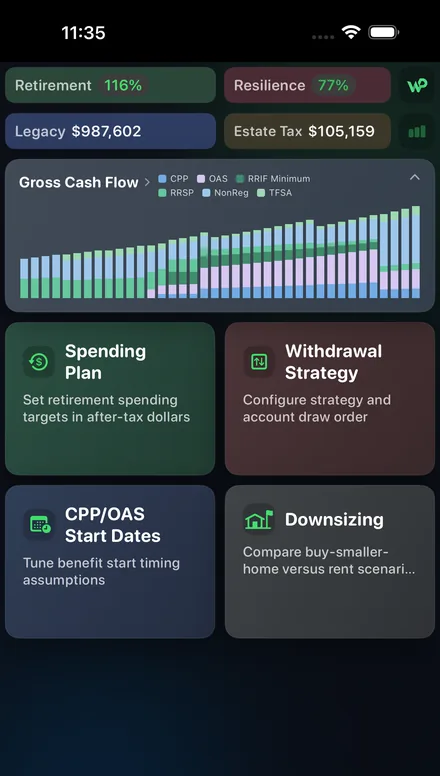
Will your net worth last?
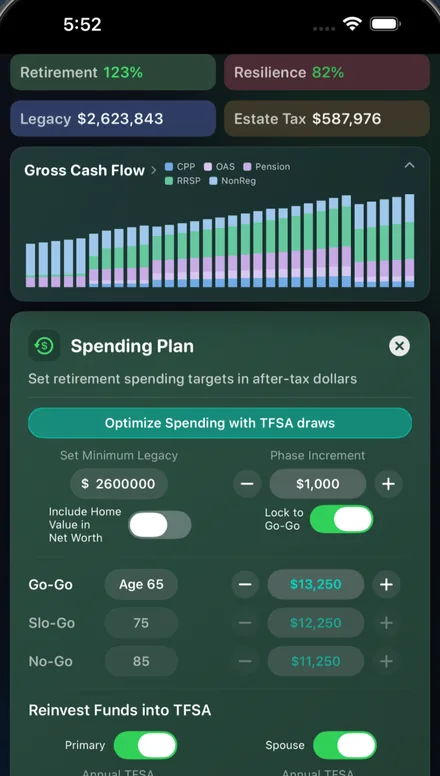
How much you can spend monthly
Terms in plain language
- Market Resilience
- What it is: the share of simulated market histories in which your plan still pays for your spending. Who it helps: anyone worried about a crash early in retirement. When to use it: after your base plan works with average returns. The catch: the past won’t repeat in the same order, so treat it as a stress test, not a forecast. Example: a score of 75% means the plan lasted in about three of every four simulated histories.
- PV Funded
- What it is: today’s savings and income compared with the present value of everything your plan has to pay. Who it helps: people who want one “are we covered today?” number. When to use it: when comparing two plans. The catch: it depends on the return and inflation you assume. Example: 110% means you hold about 10% more than the plan needs in today’s dollars.
- OAS recovery tax (clawback)
- What it is: repaying 15% of income above a yearly threshold, up to your full OAS. Who it helps to know: retirees with large RRIF withdrawals, pensions or gains. When to use it: when planning withdrawals after 65. The catch: it is based on individual income, so splitting income with a spouse can change it. Example: $10,000 of income over the 2026 threshold means a $1,500 repayment.
Frequently asked questions
- What should a retirement planning app for Canada include?
- At minimum: CPP or QPP from age 60 to 70, OAS from 65 to 70 and the OAS recovery tax, GIS for lower incomes, RRSP to RRIF by the end of the year you turn 71, TFSA withdrawals, provincial income tax, and a way to test your plan against bad markets and a long life. It should show what you can spend each month after tax, not just a final balance.
- Does Boldin work for Canadians?
- Boldin’s own help centre says its planner is based on US tax law and does not have features for the retirement and tax rules of other countries. It suggests workarounds for non-US users. Check that article before relying on it for CPP, OAS or RRSP planning.
- Can Canadians use Empower or Rocket Money?
- Empower’s support site says its Personal Dashboard only links US-based financial institutions and needs a valid US phone number to sign up. Rocket Money’s help centre says it is only available to users in the United States with US-based banks.
- Is there a Canadian retirement planning app that works without an account?
- WisePlan Wealth does not need an account: the plan stays on your iPhone, iPad, Mac or Android device. Web planners such as Optiml and RetireZest keep your plan online; both say the data is hosted in Canada.
- Which retirement planning app should I use in Canada?
- It depends on the job. If you want a detailed web planner with an optimizer, look at Canadian-built tools like Optiml or RetireZest, or ProjectionLab with its Canadian presets. If you want a phone or Mac app that answers whether your money lasts and how much you can spend each month, with no account, try WisePlan Wealth. Compare more options on our retirement planning apps hub.
- Is WisePlan Wealth free?
- It is free to download with a Standard tier. Premium and Pro are optional in-app purchases. See current prices in the App Store or Google Play.
- Is this financial advice?
- No. Projections are estimates. Confirm benefit amounts with Service Canada and tax questions with CRA or a qualified professional.
Sources (checked 7 October 2026)
- Boldin Help Center: Is PlannerPlus suitable for Canadians? (updated 29 May 2026)
- Boldin pricing
- ProjectionLab for Canadians
- Empower support: Can I link an international account?
- Rocket Money Help Center: international banks
- Optiml home page and FAQ
- RetireZest home page and FAQ
- Canada.ca: CPP, when to start your retirement pension
- Canada.ca: CPP, how much you could receive
- Canada.ca: OAS, when to start
- Canada.ca: OAS payment amounts, October to December 2026
- Canada.ca: OAS pension recovery tax
- CRA: RRSP options when you turn 71
- CRA: RRSP and TFSA dollar limits
- App Store listing for WisePlan Wealth (Canada)
Related retirement planning guides
- Free retirement budget calculator: what your pensions, income and savings give you each month, next to your spending.
- Retirement planning apps compared: Boldin, ProjectionLab, Empower, Optiml and more, side by side.
- Retirement planning app for the US: Social Security, 401(k), IRA, Roth and RMDs.
- Retirement planning in Canada: a 7-step guide: spending target, CPP, OAS, savings, withdrawals and risk.
- Retirement income planning in Canada: turning CPP, OAS, pensions and RRIF withdrawals into a monthly income.
- Retirement planning for couples: two sets of benefits, pension splitting and survivor years.
- Retirement planning at 50: catch-up savings, a target and a first projection.
- Retirement planning at 60: benefit start ages, the bridge years and RRSP to RRIF.
- Free retirement planning apps and calculators: what free tools do and where the paid tiers start.
- DIY retirement planning vs a financial advisor: what you can do yourself and when advice is worth paying for.
- Monte Carlo retirement apps: how market stress tests work and how to read a success score.
- Retirement planning app for iPhone, iPad and Mac: what to look for in an Apple retirement planner.
- Retirement planning app for Android: what to look for in an Android retirement planner.
- Retirement planning software for individuals: web planners, apps and spreadsheets compared.
Not financial, tax, investment, legal or accounting advice. Competitor details come from each company’s own website on 7 October 2026 and can change. WisePlan Wealth Ltd. is not affiliated with Boldin, ProjectionLab, Optiml, RetireZest, Empower, Rocket Money or their owners. Page dated 7 October 2026.